
Your privacy, downloading or deleting your data
Read the club's Privacy policy and Terms, agree to a new version, download your family's data, or ask the club to delete your account.
On this page
The club's Privacy policy explains what the member site stores about you and your athletes, who sees it and how long it's kept. The Terms cover using the site. Both are linked at the bottom of every page, on the phone's More menu, on Help and on your Profile.
Agree to a new version
When the club publishes a new Privacy policy or Terms, a blue box asks you to agree the next time you open the site.
- Tap the links to read what changed.
- Tick I agree… and tap Continue.
New accounts agree once, with a tick box when they sign up.
Download my data
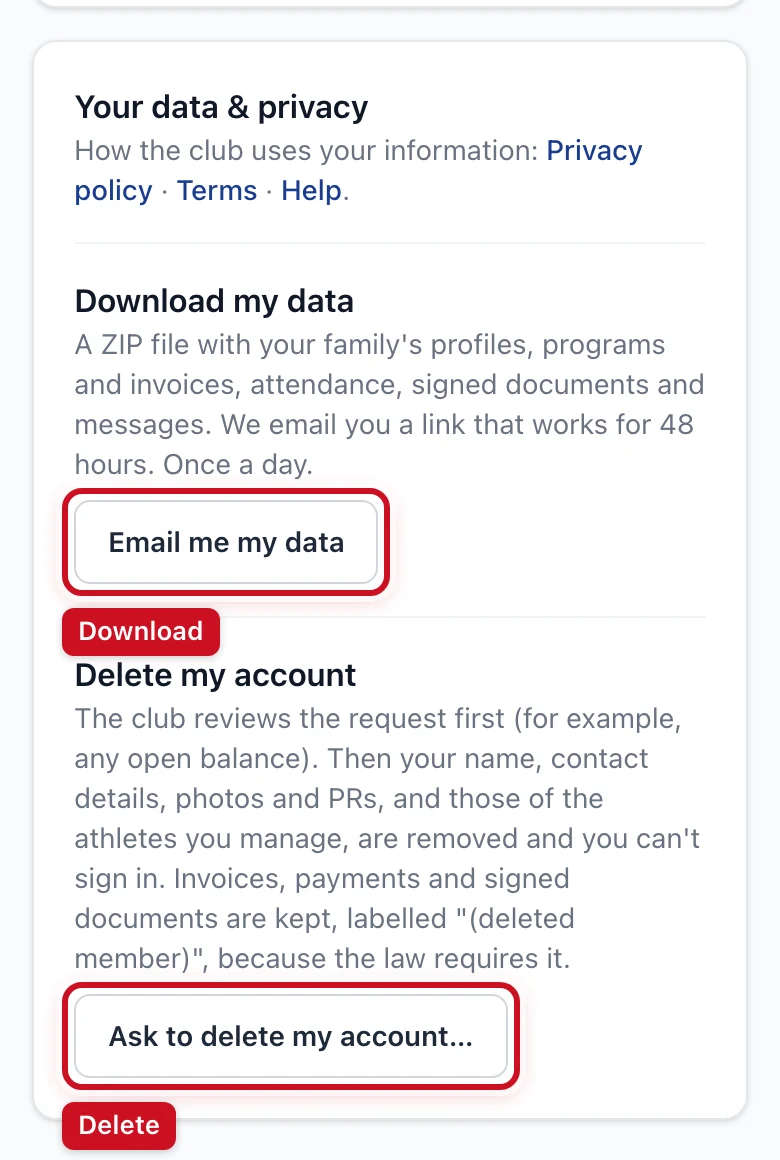
- Open Profile and scroll to Your data & privacy.
- Under Download my data, tap Email me my data.
- We email you a link, usually within a few minutes. Open it while you're signed in to download a ZIP file.
The file holds your profile and your athletes' profiles, family links, PRs, programs and invoices, payments, attendance and check-ins, signed documents (with a PDF of each) and club messages.
- The link works for 48 hours. After that the file is deleted from the club's server.
- You can ask once a day.
- The link only works for the account that asked for it.
Athletes under 18 can't download their own data: it goes to the parent or guardian who manages them. A parent's download includes each athlete on their account.
Delete my account
- Open Profile and scroll to Your data & privacy.
- Tap Ask to delete my account…, add a note if you like, tick the box and tap Send deletion request.
- The club reviews it (for example, an open balance or a program that still renews) and emails you when it's done.
Changed your mind? Tap Cancel my request on your Profile while it's still waiting.
When the account is deleted:
- Your name, email, phone, address, emergency contact, school, photos, PRs and devices are removed, and those of the athletes you manage (an athlete who also has another parent on the club stays with that parent). Only the year of birth is kept, for the club's statistics.
- You can no longer sign in.
- Invoices, payments and signed documents are kept, labelled "(deleted member)". The law requires the club to keep financial records, and signed waivers are usually kept in case of a claim.
Want a copy first? Download your data before you ask to delete the account.
Teens with their own login ask their parent: the parent deletes the account for the family. Staff accounts are removed by the club owner.
Children's information
Children under 13 can only be added by a parent or guardian, from the parent's account: adding them is the parent's consent. Teens aged 13 to 17 can start an account, but a parent approves it before they can book or sign. Parents see and can correct, download or delete their athletes' information. See the club's Privacy policy for details.
Cookies
The site only uses the cookies it needs: one that keeps you signed in and one that protects forms. There are no advertising or tracking cookies.